
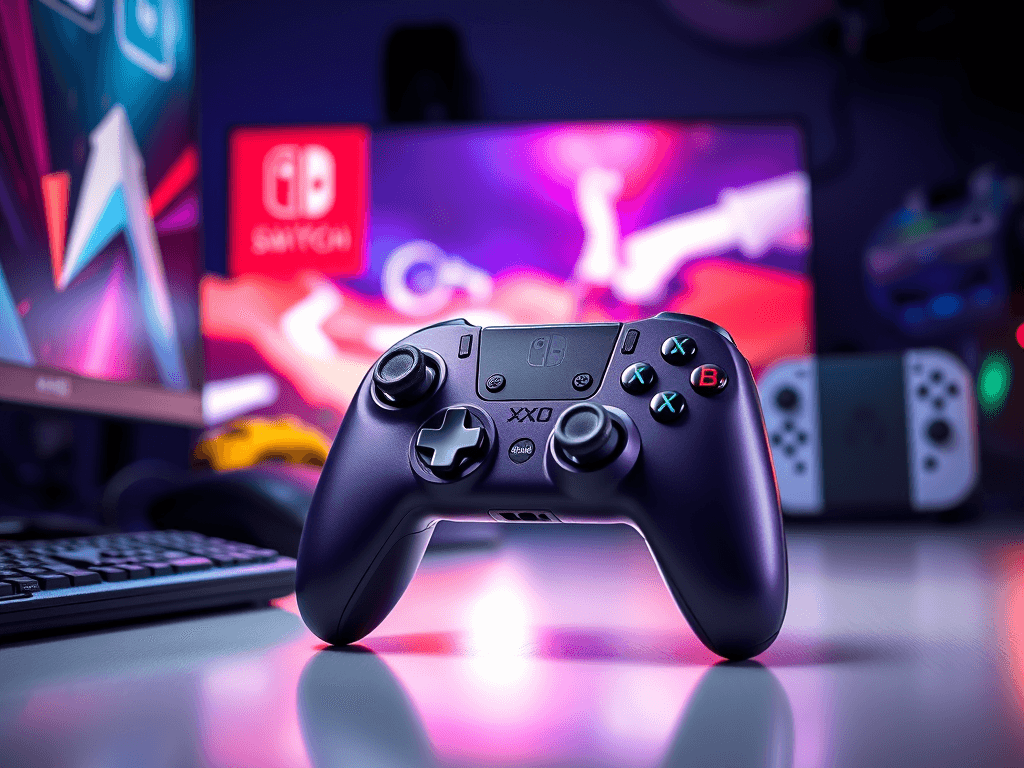
Review:
Affiliate Disclosure: This gaming controller review may contain affiliate links. We may earn a commission at no additional cost if you purchase through these links. We only recommend products we believe offer genuine value.
Introduction: If you’ve ever bounced between platforms—PC sessions, Switch couch play, and mobile gaming on the go—you’ve probably felt the pain of juggling different controllers (and dead batteries at the worst possible time). The X10 Wireless Gaming Controller aims squarely at that headache with a single Bluetooth gamepad that pairs with Windows PCs, Nintendo Switch, Android, and iOS. It promises precision Hall Effect sticks to combat drift, an extra-long battery life that keeps you in the game, and thoughtful touches like customizable back buttons and a magnetic shell you can personalize.
On paper, the X10 ticks a lot of boxes gamers care about: modern sensor tech, multi-platform pairing, fast mechanical buttons, and up to 30 hours of play on a 2-hour charge. But does it deliver a real upgrade over the basic Bluetooth pads flooding the market—and how does it stack up against stalwarts like 8BitDo?
In this in-depth review, I’ll cover the X10’s features, benefits, and best use cases, highlight who it’s perfect for, compare it to leading alternatives, and call out a few important caveats to know before you buy. By the end, you’ll know exactly whether the X10 Wireless Gaming Controller is the right next controller for your setup.
Overview What it is: The X10 Wireless Gaming Controller is a Bluetooth gamepad engineered for cross-platform play. It’s compatible with Windows PCs, Nintendo Switch, Android, and iOS, making it a one-controller solution for many setups.
Who it’s for:
- Gamers who split time between PC, Switch, and mobile
- Anyone tired of stick drift ruining precision in shooters or racers
- Players who want programmable back buttons and app-based remapping (Android)
- Shoppers who value long battery life and modern sensor tech
Core specs and highlights (per the product page):
- Platform support: Windows, Nintendo Switch, Android, iOS
- Connectivity: Bluetooth
- Hall Effect technology: Analog sticks and triggers designed for precise inputs and drift resistance
- Buttons: Fully mechanical buttons with fast, tactile response
- Battery: 1000mAh; up to 30 hours on a 2-hour charge
- Customization: Two back buttons; Android app for button remapping (A/B/X/Y/LB/RB and more)
- Personalization: Magnetic surface shell for easy color swaps
- Color option shown: Dark Purple
What’s not specified:
- No mention of 2.4Ghz wireless dongle (Bluetooth only)
- No clear statement on motion controls, vibration strength, wired mode, or turbo
- No built-in profiles or PC/macOS desktop software listed; customization is via Android app
Bottom line:
The X10 focuses on precision (Hall Effect), longevity (1000mAh battery), personalization (magnetic shell), and versatility (multi-platform). If Bluetooth is your preferred or only option across your devices, this is exactly the kind of modern controller you want to consider.
Features Here’s a closer look at what the X10 brings to the table—and how each feature shows up in play.

X10 brings
- Multi-Platform Bluetooth Compatibility
- Connects to Windows, Nintendo Switch, Android, and iOS via Bluetooth.
- Ideal for gamers using one controller on multiple platforms.
- Tip: Use an easy-to-remember name for simpler re-pairing.
- Hall Effect Analog Sticks and Triggers
- Hall sensors measure magnetic fields rather than relying on mechanical contact, which is known to reduce wear and mitigate stick drift over time.
- In practice, Hall Effect sticks help maintain accuracy in aiming, driving lines, and micro-adjustments in competitive titles.
- The product page also references Hall-based triggers—great if you play racers that benefit from smooth, linear throttle and brake input.
- Fully Mechanical Buttons
- Mechanical switches typically offer a crisp, fast actuation that’s easier to repeat reliably than soft membrane buttons.
- The X10 page notes “three distinct mechanical feels,” suggesting optimized tactile characteristics for the face buttons, bumpers, and triggers, leading to snappier inputs and more confident timing.
- The face shell is magnetic, allowing quick swaps to different colorways without tools.
- It’s an aesthetic bonus if you like changing the look of your controller to match your setup, season, or mood. Check availability of additional shells.Magnetic Surface Shell
- 1000mAh Battery with Fast Recharge
- Up to 30 hours of playtime on a single charge; recharges in roughly 2 hours.
- A meaningful upgrade over many Bluetooth controllers with smaller batteries.
- Less time tethered to a cable, more time playing.
- Customizable Back Buttons
- Two programmable back buttons let you map essential actions without lifting your thumbs off the sticks.
- For shooters, map reload or melee; for racers, map e-brake; for platformers, map jump or dash—whatever helps you keep aim steady and actions fluid.
- App-Based Button Remapping (Android)
- Dedicated Android app allows remapping of A/B/X/Y, LB/RB, and other inputs.
- Powerful for mobile players; useful if you prefer custom layouts for specific games.
- Note: The app is described as Android-only. PC or iOS users can still use OS-level remapping tools if needed, but native app remap appears limited to Android at the time of writing.
- Ergonomic Design for Long Sessions
- While exact dimensions and weight aren’t listed, the shape appears to follow a modern, hand-filling silhouette designed for grip and comfort during extended play.
- Mechanical button feel and smooth stick tension further contribute to reduced fatigue.
- Ready-to-Ship Availability
- Ships internationally with published timelines and tracking. Expect 10–30 business days for most regions; allow extra time for processing and customs.
Benefits Features are great on paper, but what do they actually do for you in-game? Here’s how the X10’s design turns into practical benefits.
- One Controller, Many Systems
- Benefit: Simplify your setup and your bag. Use one pad for Windows, Switch, Android, and iOS.
- Savings: If you typically buy one controller per platform, consolidating can save you $30–$70 per platform over time—not counting the convenience of not re-learning different layouts.
- Hall Effect Precision = Drift Resistance
- Benefit: Stable aim and consistent inputs month after month. Hall Effect sticks are widely adopted in premium controllers to combat drift commonly seen in potentiometer-based sticks.
- Real impact: Better headshots in shooters, cleaner apexes in racers, tighter platformer control. For competitive players, reduced input noise helps ensure your skill—not hardware variance—decides the outcome.
- Mechanical Buttons for Faster, More Confident Inputs
- Benefit: Mechanical switches deliver a crisp actuation that’s easier to time and spam. This can be the difference between landing a combo or dropping it, cancelling at the right frame, or consistently parrying.
- For rhythm games, fighters, and action titles, this tactile response boosts confidence and reduces mushiness that leads to misinputs.
- 30 Hours of Battery Life on 2-Hour Charge
- Benefit: Fewer charging interruptions—potentially a whole week of weeknight sessions on a single charge.
- Quantified: Compared to 10–15-hour controllers, you could cut charging sessions by half or more. Over a month, that’s hours back not tethered to a cable.
- Benefit: Fewer charging interruptions—potentially a whole week of weeknight sessions on a single charge.
- Custom Back Buttons Keep Thumbs on Sticks
- Benefit: Map actions you use constantly—reload, jump, crouch, melee, dodge—to the back. You’ll aim more steadily and react faster because your thumbs stay anchored.
- This can shave milliseconds off common actions. Across hundreds of engagements, those fractions add up.
- App-Level Remapping (Android)
- Benefit: Quickly adapt your control scheme to the game and your playstyle—no PC needed.
- Practical example: Set one profile for a shooter, another for racers, and a third for platformers so you’re never reprogramming on the fly.
- Personalization via Magnetic Shell
- Benefit: Easily switch looks to keep the controller feeling “new” and uniquely yours.
- If you stream or share photos of your setup, a quick color change keeps your aesthetic fresh without buying another controller.
- Multi-Platform Value
- Benefit: If you game on Switch and PC—and dabble on mobile—you don’t need to purchase or carry separate pads. The X10 consolidates it all, saving money and shelf space, while keeping your muscle memory consistent across platforms.
Pros
- Hall Effect sticks and triggers for drift-resistant, precise control
- Up to 30 hours of battery life; 1000mAh battery recharges in about 2 hours
- Mechanical buttons with fast, tactile response
- Works across Windows, Nintendo Switch, Android, and iOS
- Two customizable back buttons for pro-style control
- Android app for remapping core inputs
- Magnetic shell allows easy aesthetic customization
- Ergonomic shape aimed at long-session comfort
- Ready to ship with global delivery and tracking
- Signup perk: site offers a 10% first-order discount via newsletter popup
Cons
- No mention of a 2.4GHz low-latency dongle; Bluetooth-only may not satisfy esports-level latency needs
- App customization appears Android-only; no dedicated PC or iOS app listed for remapping
- No explicit confirmation of motion controls, turbo, vibration tuning, or wired USB mode
- Shipping windows can be lengthy (10–30 business days for many regions, plus processing)
- Magnetic shells beyond the base color may require separate purchase or availability checks
- No published weight or dimensions for players who prefer lighter/heavier pads
Comparison:
X10 vs Popular Alternatives If you’re cross-shopping, the big question is whether the X10’s feature mix beats best-in-class competitors for your needs. Here’s how it stacks up conceptually against a fan favorite brand many players consider: 8BitDo.
- Against 8BitDo Ultimate 2.4G
- 8BitDo’s Ultimate 2.4G includes a 2.4GHz dongle for lower-latency PC/Android play and a charging dock. Their spec page lists a 480mAh battery with up to 15 hours of life and both Bluetooth and 2.4G modes for flexible connectivity on Windows/Android, plus extensive PC software for mapping and sensitivity [source: 8BitDo Ultimate 2.4G product page].
- X10 advantage: Larger 1000mAh battery and multi-platform Bluetooth support including iOS and Switch (per the X10 page). Hall Effect triggers are mentioned for X10; the 8BitDo 2.4G model uses Hall joysticks but traditional triggers on some variants.
- 8BitDo advantage: Lower latency via 2.4G dongle; robust desktop software; included dock; deep ecosystem support.
- Who should choose X10? If you care about maximum battery life, want iOS compatibility, and are satisfied with Bluetooth performance across your devices.
- Who should choose 8BitDo? If you need the lowest latency and crave desktop-level software control and 2.4G reliability.
- Against 8BitDo Ultimate 2 Bluetooth (Switch/Windows)
- 8BitDo’s Ultimate 2 Bluetooth adds TMR joysticks, Hall Effect triggers with mode switching, RGB accents, a 2.4G USB-C dongle, and a dock—aimed at Switch and Windows with premium build and ecosystem software [source: 8BitDo Ultimate 2 BT product page].
- X10 advantage: Larger battery capacity and broader stated platform breadth (including iOS).
- 8BitDo advantage: 2.4G low-latency, desktop software, and premium features like dock and RGB lighting.
- Recommendation: If Bluetooth-only is fine and you need iOS and Switch support with long battery life, X10 holds its own. If you’re a latency purist or want a polished software ecosystem, consider 8BitDo’s offerings.
Pricing & Value
- Price: The product page doesn’t display a fixed price in the scraped view; check the live page for current pricing and promos. The site advertises a 10% first-order discount via newsletter signup.
- What you’re paying for:
- Modern Hall Effect sensors in both sticks and triggers
- Long battery life (1000mAh, up to 30 hours)
- Mechanical button feel and two back buttons
- Multi-platform Bluetooth (PC, Switch, Android, iOS)
- Android app for remapping
- Magnetic shell personalization
Value verdict: If you’re prioritizing drift resistance, cross-platform flexibility, and long battery life over 2.4G esports-grade latency, the X10 is a strong value play—especially if priced below premium controllers with docks and dongles. Factor in the newsletter discount and potential site promos to maximize savings.
User Experience Notes and Practical Tips
- Pairing workflow: For multi-device gamers, label the controller on each device and keep unused devices’ Bluetooth off when pairing to avoid conflicts.
- Profiles: While the Android app allows remapping, consider using per-game profiles in the app (if supported) or per-device OS tools to maintain consistent layouts.
- Back button strategy: Map actions you trigger frequently without aiming—reload, melee, crouch, jump—so you maintain stick control during combat.
- Battery maintenance: With a 1000mAh cell, you’ll charge less frequently. To prolong battery health, avoid leaving it at 0% for long periods; occasional top-ups are fine.
Shipping, Returns, and Support
- Shipping: Global shipping to over 200 regions; estimated 10–30 business days for many countries (longer to some locations). Processing adds 2–5 days.
- Tracking: Provided via email; allow 2–5 days for tracking to populate.
- Customs: Any customs or import fees are the buyer’s responsibility.
- Returns: 30-day money-back guarantee; unopened/unused returns require you to pay return shipping unless the wrong item was sent or delivery exceeded the guaranteed window.
- Cancellations: Allowed before shipment; contact within 12 hours of purchase to adjust or cancel.
- Tip: If you need the controller urgently, consider those lead times. For gifts or events, order early.
Who Should Buy the X10
- Multi-platform gamers who want one Bluetooth controller for PC, Switch, and mobile, including iOS
- Players burned by stick drift who want Hall Effect sticks and smooth Hall-trigger input
- Action/RPG/shooter fans who benefit from back buttons and crisp mechanical button actuation
- Gamers who value long battery life and light maintenance charging
- Style-conscious users who like swap-friendly magnetic shells
Who Might Prefer Another Option
- Competitive PC players seeking the absolute lowest latency (look for controllers with 2.4G dongles)
- Users who need desktop software on Windows/macOS for intricate macros, dead zones, and stick curves
- Players who rely on gyro/motion controls or require a wired USB mode—these features aren’t specified on the X10 page
Customer Reviews There are currently no customer reviews published on the product page. If/when reviews appear, look for feedback on Bluetooth stability across platforms, the real-world battery duration, button feel, and long-term stick performance with Hall sensors.
Conclusion
If you’re searching for a modern, no-fuss, cross-platform Bluetooth controller that focuses on the stuff that matters—drift-resistant precision, long battery life, and practical customizability—the X10 Wireless Gaming Controller is a compelling pick. Its Hall Effect sticks and triggers aim for consistent accuracy, while mechanical buttons and two programmable back buttons give you the responsiveness and control you want in fast-paced games. Add in a 1000mAh battery rated for up to 30 hours and Android-based remapping, and you’ve got a versatile pad that can handle PC, Switch, and mobile duties without breaking a sweat.
You won’t find a 2.4G dongle or a desktop software suite here, so if you’re chasing the absolute lowest latency or PC-native customization, you might consider alternatives with those features. But if seamless Bluetooth across your platforms, excellent battery endurance, and modern sensor tech are your top priorities—paired with a fair price and global shipping—the X10 delivers strong value.
Call to Action Ready to level up your cross-platform setup? Get the X10 Wireless Gaming Controller now and start enjoying drift-resistant precision and marathon battery life. Don’t forget to grab your 10% new-subscriber discount on-site.




Leave a Reply